[note class=”time”]Time reading this page: 5 minutes
Time installing the indicator: Just a few minutes with our MetaTrader Pro setup[/note]
What does it do?
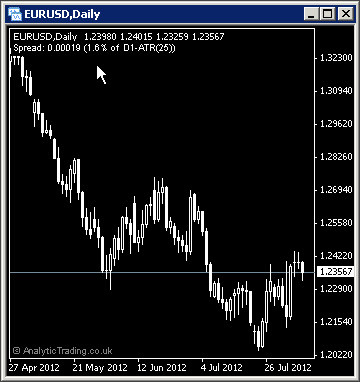
The Analytic Trading Spread indicator for MetaTrader adds a small line of text to the top left corner of your charts to show the current spread of the instrument, in price, pips or points – and these trading costs are then shown as a percentage of the current timeframe 1-bar Average Trading Range (ATR) from the last 25 bars.
What is it for?
The spread is the difference between the current bid (buy) and ask (sell) price of an instrument. Knowing this we can see the relative cost of trading this instrument, both compared to other instruments and as a percentage of the average trading range of each bar.
To understand the different trading costs, try comparing correlated instruments with different trading volumes like AUDUSD and NZDUSD, or Gold and Silver, or different instruments like EURUSD and the S&P500.
How do we use it?
The spread is your cost for entering and exiting a trade and should be taken into account when forming your trading strategy and deciding what timeframe and instruments to trade.
You will notice that the lower the timeframe – the higher the spread cost as a percentage of the average price movement over 1 bar/candle. The spread costs erode our trading edge, so to counter this effect we need to trade strategies that have an edge that more than accounts for the spread costs. The higher the trading costs, the greater the edge we need to still be able to profit from trading them.
The simplest way to minimise the proportion of the spread costs on your trading and investment is to work with strategies on the higher timeframes; Daily, Weekly and Monthly, and therefore longer-range targets.
You will also find that the more an instrument is traded, that is it's liquidity, the lower the spread is for your trading costs. Then, less liquid asset classes like currency crosses, lesser-traded commodities, and shares tend to have a higher spread trading cost as a percentage, which you should factor into your targets and expectations.
We think you will find this small piece of important information on your charts will be very revealing and it will give you a more realistic expectation to use in your calculations when deciding on what and how often to trade.
[note class=”info”]Brush up on your trading terms including Spread at babypips.com[/note]
[clearline]
Spread specific settings
In most cases these settings can be left on the default values, although users with different strategies or preferences to our own may want to be able to adjust them.
| Variable | Default Value | Possible Values | Description |
| ATRPer | 25 | whole numbers | The Average Trading Range (ATR) period that we calculate the percentage costs over. Generally a value of 25 will cover the average timespan of two timeframes higher and 5 would be a good average to cover one timeframe higher. |
| ATRTimeframe | 0 | 0, M1, M5, M15, M30, H1, H4, D1, MN | This is the timeframe used to calculate the ATR. 0 will show the current timeframe, and entering other timeframe values will use that timeframe specified. |
| ATRShift | 1 | whole numbers | To use full-bars in calculating this average we start from the previous bar/candle, the effect is relatively minor though. A value of 0 would calculate the average including the current bar's range and 2+ would start 2 bars further back, and so on. |
| DisplayType | native | native/pips/points | This is the decimal point display of price. For example on EURUSD on a 5 decimal place broker; native=0.00100, pips=10, points=100. |
[toggle title=”Pip Calculation Settings”]
Pip calculation settings used on all indicators
In most cases these can be left on the default settings but may be used where you would like price shown in pips accurately on a broker where we have not yet tested the calculation for their setup.
| Variable | Default Value | Possible Values | Description |
| TradeDPCalcType | auto | auto/semi-auto/manual | For most brokers the indicator can automatically calculate the value of a pip using “auto”. However, if pips are incorrectly displayed for a broker or instrument you can try “semi-auto” and set the instrument type for the current chart, or you can set to “manual” and specify in a number to how may decimal points the value of a pip is. |
| TradeDP | 4 | whole numbers | If you need to use TradeDPCalcType=manual then here you need to specify the number of decimal places that 1 pip is at. So for a EURUSD price displayed as 0.12345 or 0.1234 the value would be 4, for USDJPY prices displayed as 00.123 or 00.12 the value would be 2. |
| ShowExtraInfo | false | true/false | Setting this value to true will show the pip calculation mode in brackets at the end of the displayed text on the chart to help with diagnosing pip calculation. |
[/toggle]
[toggle title=”Display Settings”]
Display settings used on all indicators
In most cases these can be left on the default settings for a nice clean chart setup. You may wish to change some of these settings if you have your own preferred chart colours and layout etc.
| Variable | Default Value | Possible Values | Description |
| display_font_colour | white | any colour name or RGB value | The colour of the text comments information displayed on the chart. |
| display_font_size | 7 | any whole number | Values 6 to 12 are probably most appropriate. The default of 7 is designed to match the default instrument text information displayed in the top left corner of all MetaTrader charts. |
| display_corner | 0 | 0/1/2/3 | 0=TopLeft, 1=TopRight, 2=BottomLeft, 3=BottomRight. |
| display_distance_x | 3 | any whole number | The horizontal distance in pixels to display the comment text from the selected corner. |
| display_distance_y | 25 | any whole number | The vertical distance in pixels to display the comment text from the selected corner. |
| bgBoxColour | Black | any colour name or RGB value | The colour of the background block used to make the comment text more readable over the price bars/candles/lines behind them. |
| bgBox_width_perc | 32 | whole numbers from 20-100 | This is the multiplier used to approximate the text width for the background coloured block to match it and keep the text readable but not cover up too much of the price bars/candles/lines behind it. |
[/toggle]