[note class=”time”]Time reading this page: 5 minutes
Time installing the indicator: Just a few minutes with our MetaTrader Pro setup[/note]
What does it do?
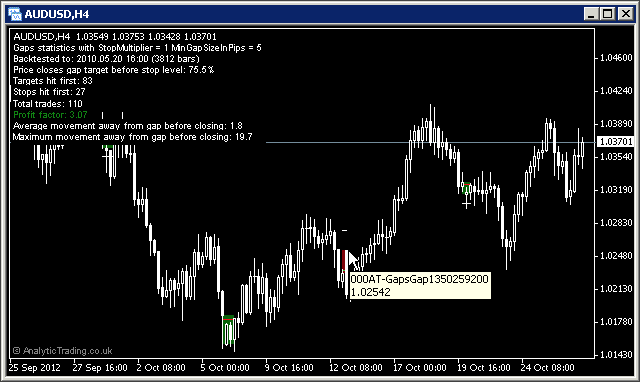
The Analytic Trading Gaps Indicator for MetaTrader automatically draws levels for the either inner high & low or open & close of gaps in the market price according to the preferred setting.
It then sets potential stop and target levels – based on adjustable parameters – and gives screen and email alerts for the gap, and potential trade setups.
Lastly, based your the settings, is counts the number of stops and targets that would be hit for each trade, and calculates the past profit-ratio in return-per-lot-traded – so you can very quickly backtest various parameters.
What is it for?
Gaps in the market price of any instrument are areas of interest in the same way that breakout candles are – in that price has only tested the price level breeched from one side and not yet the other side.
By trying various minimum gaps sizes, target levels and stop level multipliers you can find the optimum trade setups for each instrument applied to – based on the available historical chart data for each timeframe.
How do we use it?
We mainly trade the weekend forex price gaps and, in addition, look for large daily index and stocks gaps for setups that fit our criteria.
There are two ways we will trade the gap. Firstly, as an area of attraction for price movements to re-test levels for the first time from the opposite side. Secondly, as an indication of directional bias – looking for good value trade entry levels if the price gap closes at an extended ATR for the target timeframe.
[note class=”info”]We treat a gap in exactly the same way as a large breakout candle because fundamentally the same thing has occurred – but outside of market trading hours. Learn more about Breakouts at babypips.com but be careful to remember we trade them in a slightly different way, using them as new levels of interest to enter an exit trades[/note]
[clearline]
Gaps specific settings
In most cases these settings can be left on the default values, although users with different strategies or preferences to our own may want to be able to adjust them.
| Variable | Default Value | Possible Values | Description |
| BackBars | 5000 | whole numbers | This is the amount of bars back used to analyse for gaps. |
| MinGapSizeInPips | 5.0 | decimal numbers | This is the minimum gaps size to be analysed for display, statistics and alerts. |
| TargetHighLow | false | true/false | This switch is for testing the difference between targeting a full-gap closure, to targeting the close price prior to the gap opening. |
| StopMultiplier | 1.0 | decimal numbers | This is the multiplier of the trade target level used to calculate the stop level for testing various risk:reward settings. 1.0 = a 1.0R trade, 0.5 = a 2.0R trade, 2.0 = a 0.5R trade etc. |
| TargetTolleranceinATRs | 0.1 | decimal numbers | This is the adjustment inwards for the gap target level used to measure the effect of closing trades within the tolerance factor to test for near-miss gap closing. |
| GapUpColor | Maroon | any colour name or RGB value | The colour of the bullish breakout level lines. |
| GapDownColor | DarkGreen | any colour name or RGB value | The colour of the bearish breakout level lines. |
| TargetUpColor | LimeGreen | any colour name or RGB value | The colour of the target level for long trades. |
| TargetDownColor | Red | any colour name or RGB value | The colour of the target level for short trades. |
| StopColor | White | any colour name or RGB value | The colour of the stop loss level. |
| ExtendStopLines | false | true/false | This is the switch for whether to show the stop lines extending until they are hit regardless of whether the target level is hit first. |
| Show_Past_Gaps | true | true/false | This is the switch for showing past gaps visually on the chart or just the latest gap. |
| ShowStatistics | true | true/false | This is the switch for showing the trade statistics on the chart based on the above settings. |
| IncAllGapsInMoveStatistics | false | true/false | The switch to for whether to include all gap targets and stops hit in the statistics or just the first one hit. |
| SundayGapStart | 21:00 | time as a number based on the 24h clock | The time on which to use as the base for the opening price at the beginning of the week. We use this on OANDA where the open time is 20:00 GMT/BST to count trades and send alerts from between 20:00 and 22:00 GMT/BST. |
| BrokerOffsetHours | 2 | whole numbers | This is the offset in hours between your broker time and either your preferred local time or GMT/BST – used to calculate the SundayGapStart time above. |
| GapAlert | true | true/false | The switch to turn screen alerts on and off. |
| GapEmail | true | true/false | The switch to turn email alerts on and off. |
[toggle title=”Pip Calculation Settings”]
Pip calculation settings used on all indicators
In most cases these can be left on the default settings but may be used where you would like price shown in pips accurately on a broker where we have not yet tested the calculation for their setup.
| Variable | Default Value | Possible Values | Description |
| TradeDPCalcType | auto | auto/semi-auto/manual | For most brokers the indicator can automatically calculate the value of a pip using “auto”. However, if pips are incorrectly displayed for a broker or instrument you can try “semi-auto” and set the instrument type for the current chart, or you can set to “manual” and specify in a number to how may decimal points the value of a pip is. |
| TradeDP | 4 | whole numbers | If you need to use TradeDPCalcType=manual then here you need to specify the number of decimal places that 1 pip is at. So for a EURUSD price displayed as 0.12345 or 0.1234 the value would be 4, for USDJPY prices displayed as 00.123 or 00.12 the value would be 2. |
| ShowExtraInfo | false | true/false | Setting this value to true will show the pip calculation mode in brackets at the end of the displayed text on the chart to help with diagnosing pip calculation. |
[/toggle]
[toggle title=”Display Settings”]
Display settings used on all indicators
In most cases these can be left on the default settings for a nice clean chart setup. You may wish to change some of these settings if you have your own preferred chart colours and layout etc.
| Variable | Default Value | Possible Values | Description |
| display_font_colour | white | any colour name or RGB value | The colour of the text comments information displayed on the chart. |
| display_font_size | 7 | any whole number | Values 6 to 12 are probably most appropriate. The default of 7 is designed to match the default instrument text information displayed in the top left corner of all MetaTrader charts. |
| display_corner | 0 | 0/1/2/3 | 0=TopLeft, 1=TopRight, 2=BottomLeft, 3=BottomRight. |
| display_distance_x | 3 | any whole number | The horizontal distance in pixels to display the comment text from the selected corner. |
| display_distance_y | 25 | any whole number | The vertical distance in pixels to display the comment text from the selected corner. |
| bgBoxColour | Black | any colour name or RGB value | The colour of the background block used to make the comment text more readable over the price bars/candles/lines behind them. |
| bgBox_width_perc | 32 | whole numbers from 20-100 | This is the multiplier used to approximate the text width for the background coloured block to match it and keep the text readable but not cover up too much of the price bars/candles/lines behind it. |
[/toggle]