[note class=”time”]Time reading this page: 5 minutes
Time installing the indicator: Just a few minutes with our MetaTrader Pro setup[/note]
What does it do?
The Analytic Trading News Indicator for MetaTrader overlays up-coming and recent news events relevant to the instrument chart it is added to, with the optional display of all USD news events.
It will display screen alerts and send email alerts at specified times before events, and shows the typical impact of the event, previous and forecast figures – all taken from the data feed provided at forexfactory.com/calendar.php.
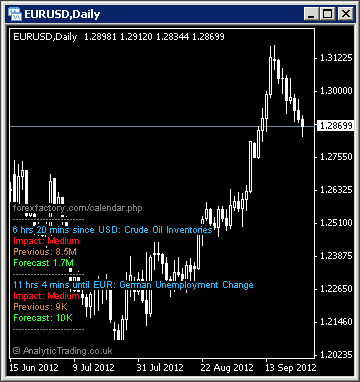
Credit for the original version of this indicator goes to DerkWehler and his excellent thread on Forex Factory where you can download his version for free. Our version is simply contains our added display and pip calculation functionality to work better for our needs.
What is it for?
Although we are technical traders, it is the news events that create the volatility we are looking for to find the best trade setups. It is also important to monitor news events when there is an open trade on the relevant instrument.
How do we use it?
By default, we have the news indicator displayed on our S&P 500 chart in the top-left window of all forex, commodity and index profile layouts, to monitor market risk-sentiment and events likely to cause significant price movements.
Then, when we have a trade open on an instrument, we will make sure we have one chart with the news indicator displayed so that we can monitor the price-action that evolves around risk events, to help manage our trades.
[note class=”info”]Make sure you bookmark and regularly review the News Calendar at ForexFactory.com and ForexPeaceArmy.com[/note]
[clearline]
News Alert specific settings
In most cases these settings can be left on the default values, although users with different strategies or preferences to our own may want to be able to adjust them.
| Variable | Default Value | Possible Values | Description |
| IncludeHigh | true/false | true | The switch to show High volatility news events on the current forex instrument chart. |
| IncludeMedium | true/false | true | The switch to show Medium volatility news events on the current forex instrument chart. |
| IncludeLow | true/false | false | The switch to show Low volatility news events on the current forex instrument chart. |
| IncludeSpeaks | true/false | true | The switch to show events where notable market influencers speak. |
| IsEA_Call | false/true | false | The News indicator has the ability to trigger EA trades for developers. |
| OffsetHours | 0 | -12 to 12 | The GMT/BST Offset for your local timezone. |
| AllowWebUpdates | true/false | true | Set this to false when another indicator instance is already running on that same symbol and same period. |
| Alert1MinsBefore | -1 | integer | The number of minutes before an event to show the first screen alert. |
| Alert2MinsBefore | -1 | integer | The number of minutes before an event to show the second screen alert. |
| Email1MinsBefore | -1 | integer | The number of minutes before an event to send the first email alert. |
| Email2MinsBefore | -1 | integer | The number of minutes before an event to send the second email alert. |
| ReportAllForUSD | true | true/false | The switch to show all USD news events regardless of the instrument chart used. |
| EnableLogging | false | true/false | Debugging logs. |
| ShowNextTwoEvents | true | true/false | The switch to show the on-chart text information for the latest 2 relevant events. |
| ShowVertNews | false | true/false | The switch to show lines on the actual chart bars for news events. |
| TxtSizeTitle | 7 | integer | The title text size. |
| TxtSize | 7 | integer | The details text size. |
| TxtColorTitle | Gray | any colour name or RGB value | The indicator title text colour. |
| TxtColorNews | DeepSkyBlue | any colour name or RGB value | The news event name colour. |
| TxtColorImpact | Red | any colour name or RGB value | The impact text colour. |
| TxtColorPrevious | Peru | any colour name or RGB value | The previous text colour. |
| TxtColorForecast | Lime | any colour name or RGB value | The forecast text colour. |
| VertTxtShift | 21 | integer | The distance of the bar lines text from the bar |
| VertLeftLineShift | 900 | integers | How far away to the left of the line we want to place our vertical news text. |
| VertRightLineShift | 200 | integers | How far away to the left of the line we want to place our vertical news text. |
| VertLineColor | SlateBlue | any colour name or RGB value | The bar lines colour. |
| VertTxtColor | DimGray | any colour name or RGB value | The bar lines text colour. |
| VertTxtSize | 7 | integers | The vertical text size. |
| NewsCorner | 2 | integers | The corner to display the next 2 events text display. 0=Upper Left, 1=Upper Right, 2=Lower Left , 3=Lower Right |
| NewsXPos | 3 | integers | The distance from the chosen corner. |
| SaveXmlFiles | true | true/false | The ability to generate daily Xml files of news events. These can be used with EAs capable of using them for filtering news events in backtesting. |
[toggle title=”Pip Calculation Settings”]
Pip calculation settings used on all indicators
In most cases these can be left on the default settings but may be used where you would like price shown in pips accurately on a broker where we have not yet tested the calculation for their setup.
| Variable | Default Value | Possible Values | Description |
| TradeDPCalcType | auto | auto/semi-auto/manual | For most brokers the indicator can automatically calculate the value of a pip using “auto”. However, if pips are incorrectly displayed for a broker or instrument you can try “semi-auto” and set the instrument type for the current chart, or you can set to “manual” and specify in a number to how may decimal points the value of a pip is. |
| TradeDP | 4 | whole numbers | If you need to use TradeDPCalcType=manual then here you need to specify the number of decimal places that 1 pip is at. So for a EURUSD price displayed as 0.12345 or 0.1234 the value would be 4, for USDJPY prices displayed as 00.123 or 00.12 the value would be 2. |
| ShowExtraInfo | false | true/false | Setting this value to true will show the pip calculation mode in brackets at the end of the displayed text on the chart to help with diagnosing pip calculation. |
[/toggle]
[toggle title=”Display Settings”]
Display settings used on all indicators
In most cases these can be left on the default settings for a nice clean chart setup. You may wish to change some of these settings if you have your own preferred chart colours and layout etc.
| Variable | Default Value | Possible Values | Description |
| display_font_colour | white | any colour name or RGB value | The colour of the text comments information displayed on the chart. |
| display_font_size | 7 | any whole number | Values 6 to 12 are probably most appropriate. The default of 7 is designed to match the default instrument text information displayed in the top left corner of all MetaTrader charts. |
| display_corner | 0 | 0/1/2/3 | 0=TopLeft, 1=TopRight, 2=BottomLeft, 3=BottomRight. |
| display_distance_x | 3 | any whole number | The horizontal distance in pixels to display the comment text from the selected corner. |
| display_distance_y | 25 | any whole number | The vertical distance in pixels to display the comment text from the selected corner. |
| bgBoxColour | Black | any colour name or RGB value | The colour of the background block used to make the comment text more readable over the price bars/candles/lines behind them. |
| bgBox_width_perc | 32 | whole numbers from 20-100 | This is the multiplier used to approximate the text width for the background coloured block to match it and keep the text readable but not cover up too much of the price bars/candles/lines behind it. |
[/toggle]