[note class=”time”]Time reading this page: 10 minutes
Time installing the Expert Advisor: Just a few minutes with our MetaTrader Pro setup[/note]
What does it do?
The Risk Manager Indicator is designed to work in a similar way to a real Risk Manager would in a proprietary trading company – keeping you working within pre-set limits in order to ensure your long-term account survival.
You set your risk tolerance per trade, and for your total open trades – this information will be used to continually feedback your open trade risk as chart information showing; the percentage of your account; the Risk:Reward ratio or R; trade points; and as money in your account currency – all as convenient text comment information on your chart.
It also has the ability to give you screen messages, send you emails, and smartphone notifications when your trades exceed your risk profile
Finally, it has the ability for you to use any lines you draw on the chart for visual trade management when trading without a broker-set stop or target.
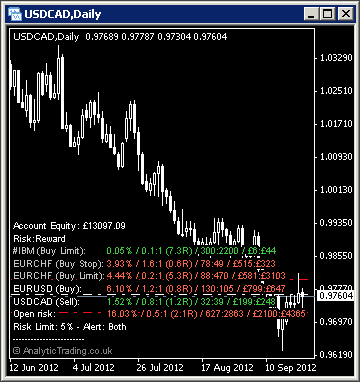
What is it for?
Your own personal Risk Manager
There is good reasoning why professional trading firms have separate people employed as Risk Managers and Analysts – because many traders will be continually affected by the psychological influences of winning and losing and fear and greed.
Risk Managers are employed to be detached from trading emotions, to help the trader work within safe limits, concentrate on the study and execution of trades with less worry – and of course, risk of ruin.
Ironically, the more intelligent the trader or investor, the more susceptible they can be to trading emotions, and likely to draw upon the most powerful human emotion of all – denial.
The power and danger of leverage
Due to the easy access to leverage nowadays when trading we, must respect its power, and ensure that we do not use it (deliberately or accidentally) in a way that exposes us to unaffordable downsides. One of the best ways to do this is to limit the leverage on your trading account. However, against our many requests, many brokers still do not offer the facility to limit leverage – particularly the market-maker brokers that take the other side of your trades – because these ones know that the more leverage you use, the greater the chance they have of profiting from your unsustainable practices – that is their trading edge.
Remember, we need to form our own strategies to suit our available time and funds, using our human creativity and analytical research. Then we must execute that strategy with the detachment and consistency of a computer in order not to erode our edge with statistically improbable responses – and avoid the temptation to micro-manage trades without allowing room for prior long-term research to be respected.
Trading discipline
The biggest problem, we have found, can come from when you have a very successful strategy, there can be a temptation to attempt to manage every single trade to turn it into a winner by using increasing amounts of risk per trade – in effect over-leveraging yourself. However this temptation goes against the foundations of probability trading, in that the probabilities are only significant over a larger number of trades. An affordable risk profile will allow us enough trades with our account, to have a drawdown tolerance that is affordable and comfortable for long-term growth.
So, in to trying to make every trade give you your desired result, you will be trying to deny the very natural fact that no strategy will have 100% winners so there must be some expectation and allowance for the losing trades – we cannot control the order in which the winning and losing trades will happen so we must allow for worst-case scenarios, that will happen, so we can remain in business through these inevitable drawdowns.
Hence, all traders and investors need strict risk management – it allows us to make a statistically significant amount of trades, and preserve our account capital to be available to make enough trades to actualise our edge.
Continual feedback
The Risk Manager Indicator is designed to keep this risk information presented to us on-screen whatever we do, so that we have constant awareness of when we are working within our pre-set and reasonable boundaries and when we have exceeded them and are increasing our likelihood of intolerable levels of drawdown or, worse still, risk losing an entire account.
Evolving trade risk
Most new traders will overlook the evolving risk while they are in a trade – which increases as price moves closer to your profit target and decreases if price moves closer to your stop loss level.
Professional traders use this knowledge of evolving risk for any given trade setup and expectancy to scale-in and scale-out of a trade. So they will take, for example, a risk profile of 5% and place a 1% risk trade at the first level in a trade setup and if price continues to move against their trade direction but still gives new price-action suggesting the expectancy is still valid have another 4 trades available to place with increasingly better risk:reward ratios as price increases the value of the trade. In the same respect, when price moves towards their profit targets, if price-action suggests an earlier reversal than previously expected then they might close increasing parts of the trade to lock-in profits to stay within their risk profile, but allow the reducing amount left trading to continue knowing part of the trade has already paid for itself.
How do we use it?
Traders can be coy about their strategies and risk profile, however, we think it is better to be open and frank about when we follow rules, and when we might break them. There are many rules of thumb touted in trading education, commonly to trade between 2-5% risk per trade but this strict adherence can be inflexible, take a lot of patience, may prevent you from learning more on how to maximise your profits and minimise losses, and from trading with a stronger position to take advantage of the best value trades as they present themselves.
Our particular risk profile is generally 1% of our account per trade and 6% on all open trades. However, and this is purely discretionary and not in any way advice, maybe 4 or 5 times a year we may extend this to 10% risk on open trades when we see very rare but very clean and compelling trade setups. We can tell you now, don't trade 10% risk yourself, it is very risky.
The way we trade is to place a 1% risk trade at our first setup level and then, if the price goes closer to our stop but price-action still confirms our trade direction then we will place additional 1% trades when we see better risk:reward value – only with candle based price-action bias. So we have up to 6 trades available in our plan to take the most from evolving price-action opportunities and to average in and out of trades based on confirmed signals within the trade.
However, if we have open trades, and price-action bias begins to change direction convincingly around our entry level, we will close in our profit targets, typically to near or within the entry level, so that we have a chance to exit the trade with minimal losses based on the new price-action bias. Of course, occasionally we might on a very rare occasion invert our trade bias but we recommend this is only something you should ever consider when you are very experienced, certainly using strict risk-management, and never, ever do it more than once on a setup – to avoid getting see-sawed out of a consolidating or ranging market.
Finally, we manage our open order book using the same risk limits so that we can place multiple trades on correlated instruments, taking the first trades to trigger and preventing excessive risk trades from executing once our risk tolerance levels are reached for open trades.
We strongly recommend that risk management is the most important aspect of successful trading, and conducting your trading with strict risk discipline will make your experience much less stressful, more enjoyable and professional. Again, all these tools are designed to keep probability on your side, including the probability of profiting consistently over the long-term.
[note class=”info”]Make sure you read up on Risk Management at babypips.com until you completely understand it.[/note]
[clearline]
Risk Manager specific settings
In most cases these settings can be left on the default values, although users with different strategies or preferences to our own may want to be able to adjust them.
| Variable | Default Value | Possible Values | Description |
| IncludePendingOrders | true | true/false | The switch to include pending orders in your overall risk management. |
| GroupByInstrument | false | true/false | The switch to order trades chronologically or grouped by instrument. |
| ShowEquityRR | true | true/false | The switch to show the evolving risk:reward ratio as a percentage of your account equity – this includes all unclosed trade profits/losses. |
| ShowRiskRewardRatio | true | true/false | The switch to show the evolving risk:reward ratio to a factor of 1 for the reward element and as a decimal in R (for Risk). |
| ShowPointsRR | true | true/false | The switch to show the evolving risk:reward ratio in points risked to points targeted. |
| ShowCurrencyRR | true | true/false | The switch to show the evolving risk:reward ratio in your broker account currency. The amount of money you are risking for the potential profit target. |
| InstrumentRiskLimit | 2.0 | decimals | The risk percentage per trade to alert when your risk profile setting has been exceeded. |
| TotalRiskLimit | 5.0 | decimals | The risk percentage of your total account equity to alert when your risk profile setting has been exceeded. |
| RiskExcessAlert | true | true/false | The switch to show screen alerts when your risk profile setting has been exceeded. |
| RiskExcessEmail | true | true/false | The switch to send an email when your risk profile setting has been exceeded. |
| OpenStopPips | 0 | integer | The default number of pips to use to calculate a theoretical stop level when trading without broker-set stops. |
| OpenTargetPips | 0 | integer | The default number of pips to use to calculate a theoretical target level when trading without broker-set targets. |
| OpenStopATRMultiple | 5 | integer | The default multiplier of the ATR value to use to calculate a theoretical stop level when trading without broker-set stops. |
| OpenTargetATRMultiple | 5 | integer | The default multiplier of the ATR value to use to calculate a theoretical target level when trading without broker-set targets. |
| OpenStopsTargetsATR | 25 | integer | The ATR value used to calculate the multipliers above. |
| OpenStopsTargetsATRtf | 0 | 0, M1, M5, M15, M30, H1, H4, D1, W1, MN | The timeframe used to calculate the ATR for the multipliers used above. 0 uses the current chart timeframe. |
[toggle title=”Pip Calculation Settings”]
Pip calculation settings used on all indicators
In most cases these can be left on the default settings but may be used where you would like price shown in pips accurately on a broker where we have not yet tested the calculation for their setup.
| Variable | Default Value | Possible Values | Description |
| TradeDPCalcType | auto | auto/semi-auto/manual | For most brokers the indicator can automatically calculate the value of a pip using “auto”. However, if pips are incorrectly displayed for a broker or instrument you can try “semi-auto” and set the instrument type for the current chart, or you can set to “manual” and specify in a number to how may decimal points the value of a pip is. |
| TradeDP | 4 | whole numbers | If you need to use TradeDPCalcType=manual then here you need to specify the number of decimal places that 1 pip is at. So for a EURUSD price displayed as 0.12345 or 0.1234 the value would be 4, for USDJPY prices displayed as 00.123 or 00.12 the value would be 2. |
| ShowExtraInfo | false | true/false | Setting this value to true will show the pip calculation mode in brackets at the end of the displayed text on the chart to help with diagnosing pip calculation. |
[/toggle]
[toggle title=”Display Settings”]
Display settings used on all indicators
In most cases these can be left on the default settings for a nice clean chart setup. You may wish to change some of these settings if you have your own preferred chart colours and layout etc.
| Variable | Default Value | Possible Values | Description |
| display_font_colour | white | any colour name or RGB value | The colour of the text comments information displayed on the chart. |
| display_font_size | 7 | any whole number | Values 6 to 12 are probably most appropriate. The default of 7 is designed to match the default instrument text information displayed in the top left corner of all MetaTrader charts. |
| display_corner | 0 | 0/1/2/3 | 0=TopLeft, 1=TopRight, 2=BottomLeft, 3=BottomRight. |
| display_distance_x | 3 | any whole number | The horizontal distance in pixels to display the comment text from the selected corner. |
| display_distance_y | 25 | any whole number | The vertical distance in pixels to display the comment text from the selected corner. |
| bgBoxColour | Black | any colour name or RGB value | The colour of the background block used to make the comment text more readable over the price bars/candles/lines behind them. |
| bgBox_width_perc | 32 | whole numbers from 20-100 | This is the multiplier used to approximate the text width for the background coloured block to match it and keep the text readable but not cover up too much of the price bars/candles/lines behind it. |
[/toggle]